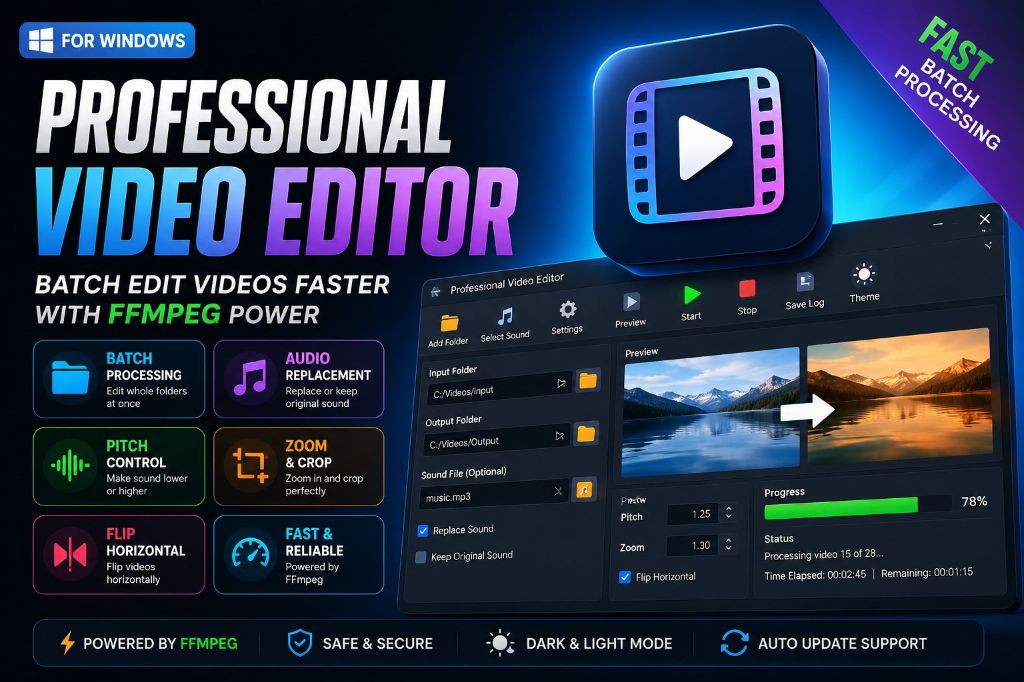
Whether you’re a content creator, marketer, educator, or business owner, editing dozens or even hundreds of videos manually can quickly become time-consuming. Professional Video Editor was built to simplify that workflow by providing a fast, modern desktop application for Windows that processes entire folders of videos with just a few clicks.
Unlike traditional video editing software that focuses on editing one project at a time, this application is designed for batch processing. You select a folder, choose your editing options, and the software automatically processes every supported video file while displaying real-time progress and detailed logs.
Designed for Productivity
The application is built with a clean, responsive interface that helps users stay focused. Features such as a modern toolbar, dark mode, progress tracking, and automatic update support make the editing experience straightforward and efficient.
Instead of repeating the same editing steps for every video, you can configure the settings once and let the application handle the rest.
Batch Video Processing
Processing multiple videos individually is often the biggest bottleneck for creators. Professional Video Editor allows you to:
Process an entire folder of videos automatically.
Replace the original files or save edited versions to a new location.
Monitor processing progress in real time.
Review detailed logs for every completed task.
This makes it especially useful for YouTube channels, online courses, social media content, product videos, and business marketing materials.
Flexible Audio Options
Audio plays an important role in video production. The application provides flexible audio controls that work for different workflows.
You can:
Keep the original audio track.
Replace the audio with another music or voice track.
Edit videos that contain no audio.
Adjust audio pitch to create higher or lower vocal effects.
Because these settings can be applied to every file in a folder, repetitive editing tasks become much faster.
Built-In Video Transformations
Professional Video Editor includes several practical video transformations that are commonly required when preparing content for different platforms.
Current editing options include:
Horizontal flip
Adjustable zoom
Audio replacement
Pitch adjustment
Additional features are planned for future releases, including rotation, trimming, watermark support, subtitles, playback speed adjustments, brightness, contrast, and more.
Powered by FFmpeg
At its core, the application uses FFmpeg, one of the most trusted multimedia processing engines available.
FFmpeg provides excellent compatibility with common video formats while delivering reliable performance for batch processing. By combining FFmpeg with a modern PySide6 interface, Professional Video Editor offers powerful functionality without requiring users to learn command-line tools.
Automatic Updates
Keeping software up to date should be simple.
Professional Video Editor includes an update system that checks for new releases, downloads verified update packages, and installs them through a dedicated updater application. Every release can also be verified using SHA-256 checksums to ensure the downloaded files are authentic and complete.
Modern Windows Desktop Experience
The application is built specifically for Windows using Python and PySide6, delivering a native desktop experience with features such as:
Responsive user interface
Light and dark themes
Progress indicators
Status bar
Toolbar shortcuts
Automatic update notifications
Efficient batch processing
The result is an application that feels familiar while remaining lightweight and easy to use.
Perfect for Many Types of Users
Professional Video Editor is suitable for a wide range of users, including:
YouTube creators
TikTok creators
Instagram content creators
Facebook marketers
Digital agencies
Video editors
Online educators
Small businesses
Marketing teams
Freelancers
Anyone who regularly edits multiple videos can benefit from automating repetitive tasks.
Continuous Improvements
The application is actively maintained with new features, performance improvements, and bug fixes released regularly. Users can view the complete version history, release notes, and download the latest version directly from the website.
Our goal is to make Professional Video Editor a reliable desktop solution for batch video editing while continuously expanding its capabilities based on user feedback.
Download Professional Video Editor
If you’re looking for a simple yet powerful Windows application to automate repetitive video editing tasks, Professional Video Editor provides a fast and efficient solution.
Download the latest version, explore the release history, and start processing your videos with a streamlined workflow designed to save time and improve productivity.